Thursday, March 22, 2012

TechNet Virtual Labs: Windows Server 2003


Step into the Windows Server 2003 Virtual Labs for Free

It's simple: no complex setup or installation is required to try out Windows Server 2003 running in the full-featured TechNet Virtual Lab. You get a downloadable manual and a 90-minute block of time for each module. You can sign up for additional 90-minute blocks anytime.

Getting Started

TechNet Virtual Labs: SQL Server 2008

Step into the SQL Server 2008 Virtual Labs for Free

It's simple: no complex setup or installation is required to try out SQL Server 2008 running in the full-featured TechNet Virtual Lab. You get a downloadable manual and a 90-minute block of time for each module. You can sign up for additional 90-minute blocks any time.

Getting Started

How to search user in Lync server 2010 control panel?

How to search user in Lync server 2010 control panel?
You can search for users by using the Lync Server Control Panel or the Active Directory Users and Computers snap-in.

To search for one or more users via Lync server control panel-

1.   From a user account that is assigned to the CsUserAdministrator role or the CsAdministrator role, log on to any computer in your internal deployment.

2.   Open a browser window, and then enter the Admin URL to open the Lync Server Control Panel. For details about the different methods you can use to start Lync Server Control Panel.

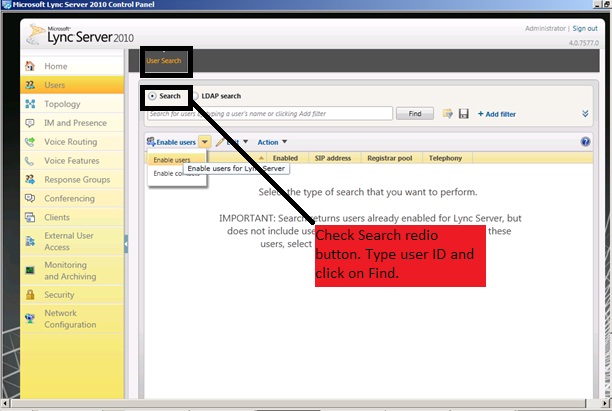
3.   In the left navigation bar, click Users.

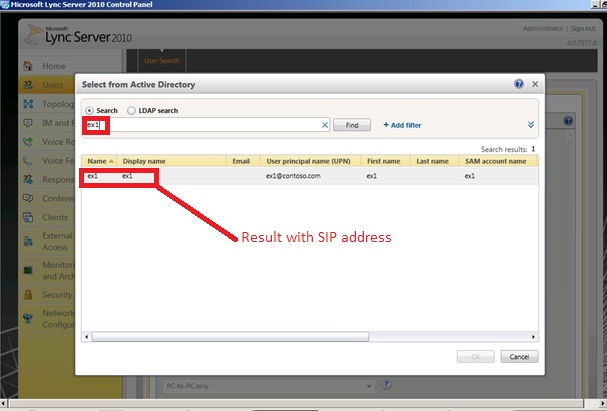
4.   In the Search users box, type all or the first portion of the display name, first name, last name, SAM account name, SIP address, or line URI of the user account that you want to search for, and then click Find.

5.   (Optional) Specify additional search criteria to narrow the results:


     a. Click the expand arrow button in the upper-right corner of the screen above Search  results, and then click Add Filter.

    b. Enter the user property by typing it or clicking the arrow in the drop-down list to select a user property.

   c. In the Equal to list, click Equal to or Not equal to.

   d. In the text box, type the search criteria you want to use to filter search results, and then click Find.